Archive for category Software

Netbeans Look and Feel Problem

How to fix Netbeans 7.4 (in my case) problems with Linux Mint Cinnamon:

Download JGoodies Looks and JGoodies Common and extract zip files somewhere.

Change your <NETBEANS-FOLDER>/etc/netbeans.conf by adding “–cp:p /home/ehurmuzov/java/jgoodies/jgoodies-looks-2.5.3/jgoodies-looks-2.5.3.jar –cp:p /home/ehurmuzov/java/jgoodies/jgoodies-common-1.6.0/jgoodies-common-1.6.0.jar  –laf com.jgoodies.looks.plastic.Plastic3DLookAndFeel” to the netbeans_default_options line:

netbeans_default_options=”-J-client -J-Xss2m -J-Xms32m -J-XX:PermSize=32m -J-Dapple.laf.useScreenMenuBar=true -J-Dapple.awt.graphics.UseQuartz=true -J-Dsun.java2d.noddraw=true -J-Dsun.java2d.dpiaware=true -J-Dsun.zip.disableMemoryMapping=true –cp:p /home/ehurmuzov/java/jgoodies/jgoodies-looks-2.5.3/jgoodies-looks-2.5.3.jar –cp:p /home/ehurmuzov/java/jgoodies/jgoodies-common-1.6.0/jgoodies-common-1.6.0.jar  –laf com.jgoodies.looks.plastic.Plastic3DLookAndFeel”

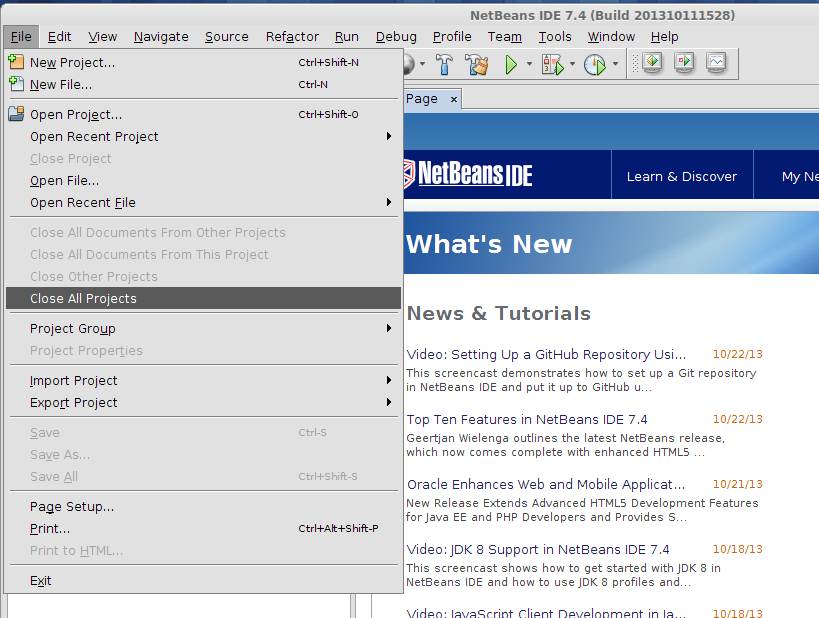
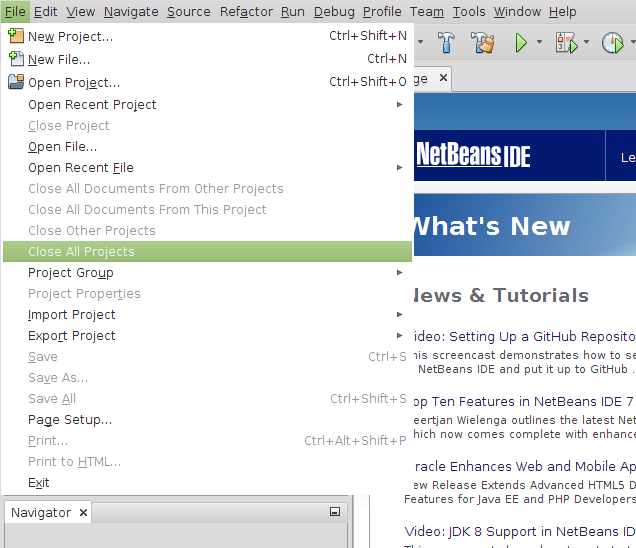
Here is the result:

Before:
nb-before-menu


After:

nb-after-menu


Much better, isn’t it?

My Linux Applications

Short list of what I’m using on my Linux Desktop:

Netbeans (a couple of versions)
SQL Developer – Oracle
Squirrel SQL Client
JEdit
Meld
VirtualBox

Filezilla
gSTM
FeeeMind
xCHM
yEd Graph Editor
mc
Remmina Remote Desktop Client
Skype
Wireshark
Rhythmbox
VLC Media Player

ClamTK
catfish
Darktable
Dia
Inkscape
MyPaint

Get Geo Location from Image File


public static GeoLocation getMetadata(String filename) {
    GeoLocation gl = null;

    try {
        File file = new File(filename);
        Metadata metadata = ImageMetadataReader.readMetadata(file);

        for (Directory directory : metadata.getDirectories()) {
            if (directory instanceof GpsDirectory) {
                GpsDirectory gpsd = (GpsDirectory)directory;
                gl = gpsd.getGeoLocation();
            }
        }

    } catch (ImageProcessingException | IOException ex) {
        Logger.getLogger(ImageHelper.class.getName()).log(Level.SEVERE, null, ex);
    }
    return gl;
}


Very simple.
The example uses metadata extractor in Java.
http://www.drewnoakes.com/code/exif/

JSF 2.0 Composite Components #1

Starting with something very easy – label. We’ll make it bold to separate from input/output text.

Usual directories in the web project:


<Web Pages>
<Web Pages>/WEB-INF
<Web Pages>/resources
<Web Pages>/resources/css
<Web Pages>/resources/images
<Web Pages>/resources/realsoft


In bold is the directory where I’ll put my custom components. Choose a suitable for you name. Below is label.xhtml file:

<?xml version='1.0' encoding='UTF-8' ?>
<!DOCTYPE html PUBLIC "-//W3C//DTD XHTML 1.0 Transitional//EN" "http://www.w3.org/TR/xhtml1/DTD/xhtml1-transitional.dtd">
<html xmlns="http://www.w3.org/1999/xhtml"
xmlns:cc="http://java.sun.com/jsf/composite"
xmlns:h="http://java.sun.com/jsf/html">
<!-- INTERFACE -->
<cc:interface>
  <cc:attribute name="value" required="true" />
  <cc:attribute name="for" required="false" />
</cc:interface>
<!-- IMPLEMENTATION -->
<cc:implementation>
  <span id="#{cc.clientId}" class="label" >
    <h:outputLabel id="#{cc.clientId}label" value="#{cc.attrs.value}" for="#{cc.attrs.for}" />
  </span>
</cc:implementation>
</html>


Java SE 1.6.0_21 (6u21)

Java SE 1.6.0_21 released.

Release Notes